
Skip to main content
-
Quick3DPlan
-
-
- Quick3DPlan Registration Form
- Limitations of the ‘Demo’ version of Quick3DPlan and Quick3DCloset
- Tips to download the installer correctly
- How to buy the Quick3DPlan or Quick3DCloset subscription
- How to reset the password in Quick3DPlan or Quick3DCloset
- How to check my program's version
- How to recover a project when the software was closed unexpectedly
- How to download Quick3DPlan for Mac again from the Mac App Store
- Quick3DPlan Studio
- How to transfer the license to another computer (*Quick3DPlan 12 and earlier)
- History of Quick3DPlan: Information about Quick3DPlan, Quick3DPlan DS, and Quick3DCloset
- How to find out which version of Quick3DPlan you have installed
- How do I update an older version of Quick3DPlan to the latest version, and what is the price?
- How to download an older version of Quick3DPlan
- Where to get the download link for Quick3DPlan or Quick3DCloset and how to download the program
- How does the technical support for Quick3DPlan and Quick3DCloset work?
- Mostrar artículos restantes (1) Contraer artículos
-
- ERROR: SetupNew\setup.cpp (140)
- ERROR: File System 0004. : c:\Quick3Dplan/???.dll : curpath=C:/Quick3Dplan
- Feature transfer error
- Runtime Error!
- Error message: “The application has failed to start because its side-by-side configuration is incorrect”
- Error message: “The requested operation requires elevation”
- Error message: “This app can't run on your PC”
- Possible reasons why Quick3DPlan or Quick3DCloset are not working or will not start
- Windows® 11 error message: “Windows Security – Part of this app has been blocked”
- Error message: “Quick3DPlan DS cannot be installed on ‘Macintosh HD’ because macOS 14.2 or later is required.”
- Render Error: "Something went wrong. Nothing rendered."
- Issue when saving and opening projects on the Windows® Desktop caused by having multiple user accounts
-
- How to set up the “3D image detail” level
- How to customize catalog measures in Quick3DPlan
- How to insert your company logo to the impressions
- How to print a “3-view window” of the design
- How to print a photorealistic image or render in Quick3DPlan or Quick3DCloset
- How to print plans and sketches in PDF to be able to send them by e-mail to your clients
- How to print a dimensioned front elevation
- How to correctly print a kitchen plan while making the most of the print margins
- How to add a SketchUp object in Quick3DPlan or Quick3DCloset
-
- How to place a cabinet in a non 90º angle corner
- How to place cabinets, countertops and upstands in a corner with a pillar
- How to simulate a ceiling
- How to fill up a small gap between a cabinet and a non-perpendicular wall
- How to make a wall with different backsplashes
- How to put 2 materials on the floor of the room
- How to create beams in the architecture
- How to shorten a previously inserted partition wall
- How to move a wall to increase room size
-
- How to place a cabinet in a non 90º angle corner
- How to place cabinets, countertops and upstands in a corner with a pillar
- How to fill up a small gap between a cabinet and a non-perpendicular wall
- How to apply GOLA type handles to a selected door
- How to erase the handles
- How to insert an L-shape corner with a different door width
- How to make a peninsula or island in the middle of the kitchen with a “breakfast bar”
- How to place a 35-cm folding door cabinet above a refrigerator
- How to place a 60-cm high fridge under a worktop
- How to set the number of drawers in a unit
- How to insert a blind corner for a sink
- How to place 2 rows of wall units with different depths
- How to place a tall cabinet with doors at the top and bottom, and 2 shelves in the center
- How to place a sink unit with drawers instead of doors
- How to put a worktop on top of a dishwasher or washing machine
- How to remove cornices and light pelmets from wall cabinets
- How to extend a cabinet’s countertop to make a “breakfast bar”
- How to adjust the sides to align them with the door
- How to add a plinth to cover the legs of a cabinet
- How to put a “ceiling scribe” cornice
- How to place backsplashes between base and wall units
- How to place a side panel made of the same material as the countertop to create a “waterfall countertop”
- How to insert a corner unit with an upstand in just one side only
- How to add/install “undermount sinks”
- How to change the installation height of appliances in oven and microwave tall cabinets
- How to place a sink in a corner base cabinet
- How to install a plinth in the gap between two cabinets
- Mostrar artículos restantes (12) Contraer artículos
-
- How to adjust the “Closets module” window to be able to see the lower buttons (in the case they are not visible)
- How to hide the closet doors to see the interior in Quick3DPlan
- How to place a vertical divider that fits in a selected space in Quick3DPlan
- How to reduce the depth of one of the modules to adapt it to a pillar in Quick3DPlan
- How to “simulate” an L-shaped closet, a closet with 2 fronts, or a corner closet in Quick3DPlan
- How to make a “built-in closet” in Quick3DPlan
- How to change the number of modules in cabinets with sliding and swing doors in Quick3DPlan
- How to create “hanging closets” in Quick3DPlan
-
- How to use perspectives in Quick3DPlan or Quick3DCloset
- How to use the option to create photorealistic images or “Renders”
- How to activate the “image history” in the Render window
- How the lights work and how to configure them correctly
- How to show elevations of furniture in narrow kitchens
- How to save a picture of a kitchen dimensioned elevation
- How to change the door, baseboard and worktop colour and material
- How to place a side panel made of the same material as the countertop to create a “waterfall countertop”
-
-
-
Quick3DCloset
-
- Basic Quick3DCloset Course
- 1. Drawing the architecture in Quick3DCloset
- 2. Create a closet #1: Catalogs, Doors, and Structure
- 3. Create closet #2: Element distribution and pricing
- 4. Changing materials in Quick3DCloset
- 5. Views and perspectives, and hiding closet doors in Quick3DCloset
- 6. Lights and render in Quick3DCloset
-
-
- Quick3DCloset Registration Form
- Limitations of the ‘Demo’ version of Quick3DPlan and Quick3DCloset
- Tips to download the installer correctly
- How to buy the Quick3DPlan or Quick3DCloset subscription
- How to reset the password in Quick3DPlan or Quick3DCloset
- How to check my program's version
- How to recover a project when the software was closed unexpectedly
- History of Quick3DPlan: Information about Quick3DPlan, Quick3DPlan DS, and Quick3DCloset
- Where to get the download link for Quick3DPlan or Quick3DCloset and how to download the program
- How does the technical support for Quick3DPlan and Quick3DCloset work?
-
- ERROR: SetupNew\setup.cpp (140)
- ERROR: File System 0004. : c:\Quick3DCloset/???.dll : curpath=C:/Quick3DCloset
- Feature transfer error
- Runtime Error!
- Error message: “The application has failed to start because its side-by-side configuration is incorrect”
- Error message: “The requested operation requires elevation”
- Error message: “This app can't run on your PC”
- Possible reasons why Quick3DPlan or Quick3DCloset are not working or will not start
- Windows® 11 error message: “Windows Security – Part of this app has been blocked”
- Render Error: "Something went wrong. Nothing rendered."
- Issue when saving and opening projects on the Windows® Desktop caused by having multiple user accounts
-
- How to set up the “3D image detail” level
- How to insert your company logo to the impressions
- How to print a “3-view window” of the design
- How to print a photorealistic image or render in Quick3DPlan or Quick3DCloset
- How to print plans and sketches in PDF to be able to send them by e-mail to your clients
- How to add a SketchUp object in Quick3DPlan or Quick3DCloset
-
- How to change the accessories material
- How to hide the closet doors to see the interior in Quick3DCloset
- How to place a vertical divider that fits in a selected space in Quick3DCloset
- How to create a pocket to adapt the closet to a pillar in Quick3DCloset
- How to “simulate” an L-shaped closet, a closet with 2 fronts, or a corner closet in Quick3DCloset
- How to make a “built-in closet” in Quick3DCloset
- How to create “hanging closets” in Quick3DCloset
- How to save a closet in Quick3DCloset so you can retrieve it later
- How to save the objects inserted in a closet module as a template for use in future Quick3DCloset projects
- How to configure a closet with a single side panel and a single shelf by modifying their depth
-
-
Published
Updated
ByMicrocad Software
How to erase the handles
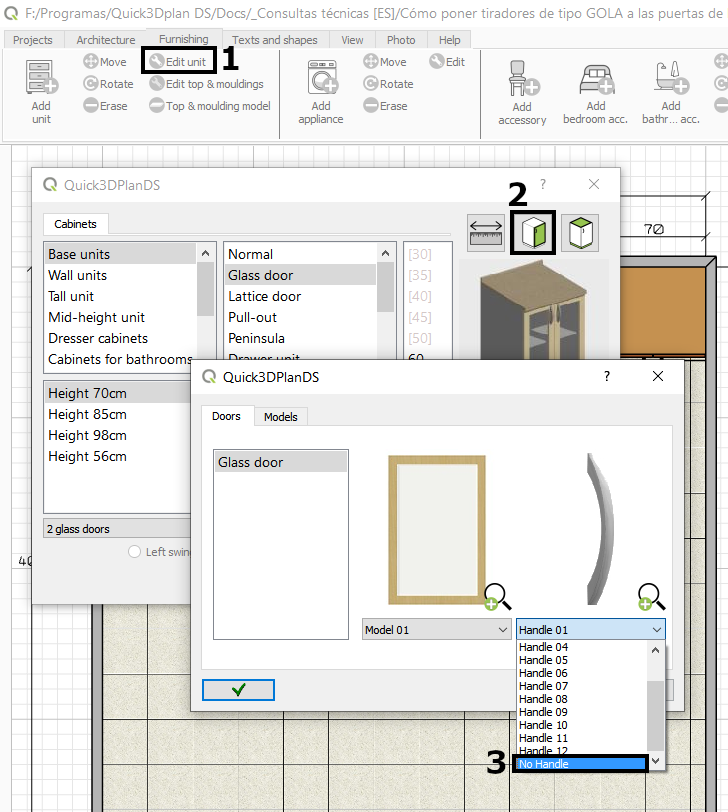
In Quick3DPlan, it is possible to insert the cabinets directly without the handle, or modify them later using the “Edit Cabinet” tool [1]. Just click on the insertion window (or the edit one), click on “Doors” [2], and select the “No handle” option [3] in the dropdown menu:

Table of contents